Think of this: someone’s on their phone in a crowded café, late at night in bed, or sneaking a scroll during a meeting. The sound is off. The captions aren’t there. Yet your video makes them stop. That’s not luck; that’s design.
Welcome to the Silent Scroll Strategy: a platform-aware way of creating videos that communicate clearly even with zero audio and zero on-screen text. In a world where attention is short and environments are unpredictable, clarity has become the new creativity.
This is where Pippit enters the workflow, not just as an editor, but as a thinking visual partner in its own right. With features like an AI storyboard generator, Pippit helps creators plan sequences where motion, framing, and visual cues do the talking long before any words appear.
Let’s unpack why silence-first videos win-and how to design them intentionally.

Silence isn’t the Enemy, Confusion Is
It seems many creators believe that captions are a necessity. While they’re great and a good assistive tool, very often, leaning on text too much conceals weak visual storytelling.
A video will fall apart in the absence of words when, in fact, the images were not direct enough in the first place. Silent-first videos:
Strong visual cause-and
Clear actions and reactions
Framing to guide the eye.
Pacing and rhythm instead of dialogue
If visual images need no explanation, then sound and text become enhancements, not crutches.
Why Platforms Reward the Quietly Clear
Social media is designed for rapid decision-making. A user doesn’t listen first; they see first.
Videos functioning without audio are likely to:
Hook faster in the first two seconds
Perform well in autoplay feeds
Feel accessible across cultures and languages
Move seamlessly between platforms and placements
Design for silence isn’t a constraint. Design for silence is an advantage.
Visual Grammar: The Language of Silent Video
In “Visual Grammar,” Silent video is like body language. Small details take on importance.
One look substitutes for a statement. An action will substitute for a reason. A cut eliminates a paragraph.
Artists with mastery over this apply:
Exaggerated but natural motion
Subject isolation, clear
Contrast between the “before” and “after.”
Simple, readable compositions
If you can summarize a video in one sentence without hearing it, you’re doing it right, is one of those tips that sounds obvious but is incredibly important to consider.
When Text Gets in the Way of the Message
Text-filled videos tend to assume their audience can read. However, clickstream data tells a different story.
Large quantities of text are presented to the audience on the screen that can:
Compete with the main action
Distracting from emotional beats
Date the information quickly
Break immersion
This is why many creators choose not to include any text in video assets anymore—at least in prototype versions to see if it communicates through video.
If it can be done silently, without texting, then it will work everywhere.
Creating for “I Get It Instantly” Moments
The silent scroll strategy is all about instant understanding.
Ask yourself:
Can the proposition be grasped within three seconds?
Is the main action impossible to miss?
Is the ending a visual conclusion of the idea?
When the response is yes, then captions are optional, not essential.
The Hidden Superpower of Clean Frames
Clean frames make your video more flexible.
Once the text and clutter are removed, a single clip can then be repurposed for:
Paid advert
“Hero” backgrounds for landing pages
Product demo loop
Reel with various storytelling overlays
It is where a transparent background maker–like workflow comes into its own, where graphics can be overlaid, reused, and transformed without having to recut them.
Applying Theories to Life: Maximizing the Power of Silence
Knowing the strategy is one thing, but having an optimal execution process is quite different.
Now let’s put this idea to practice and demonstrate, step by step, how content producers using Pippit can remove text from video.
From Loud Edits to Quietly Powerful Images with Pippit
Before you start designing for silence, you have to clean up your visual foundation first. These are the steps you need to follow.
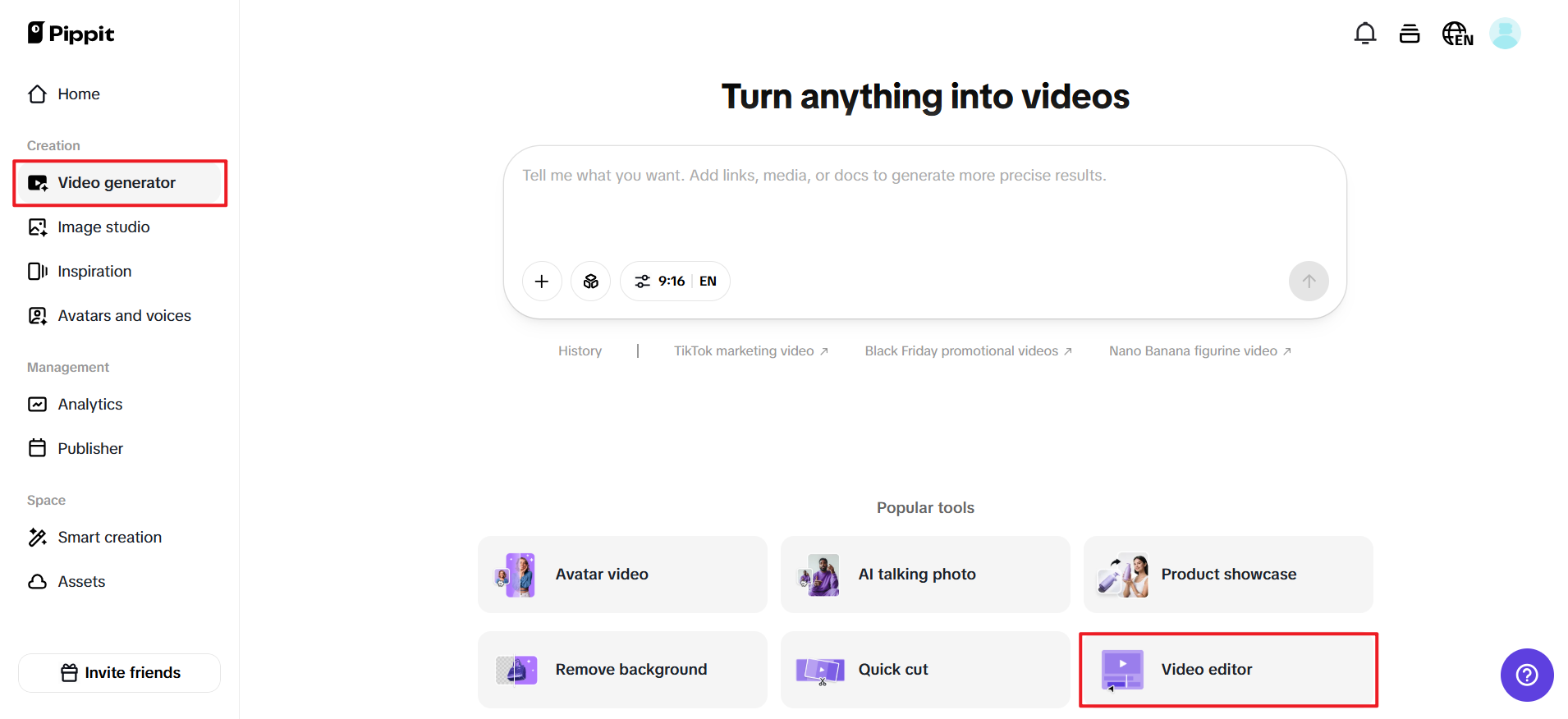
To extract text from video AI free, you just have to register for Pippit with your Google, TikTok, or Facebook account and select “Video Generator” or “Smart Tools” in the left bar. Select “Video editor” and then drag and drop the video, or select “Click to Upload” to upload from your computer.
Step 2: Remove Text from Video
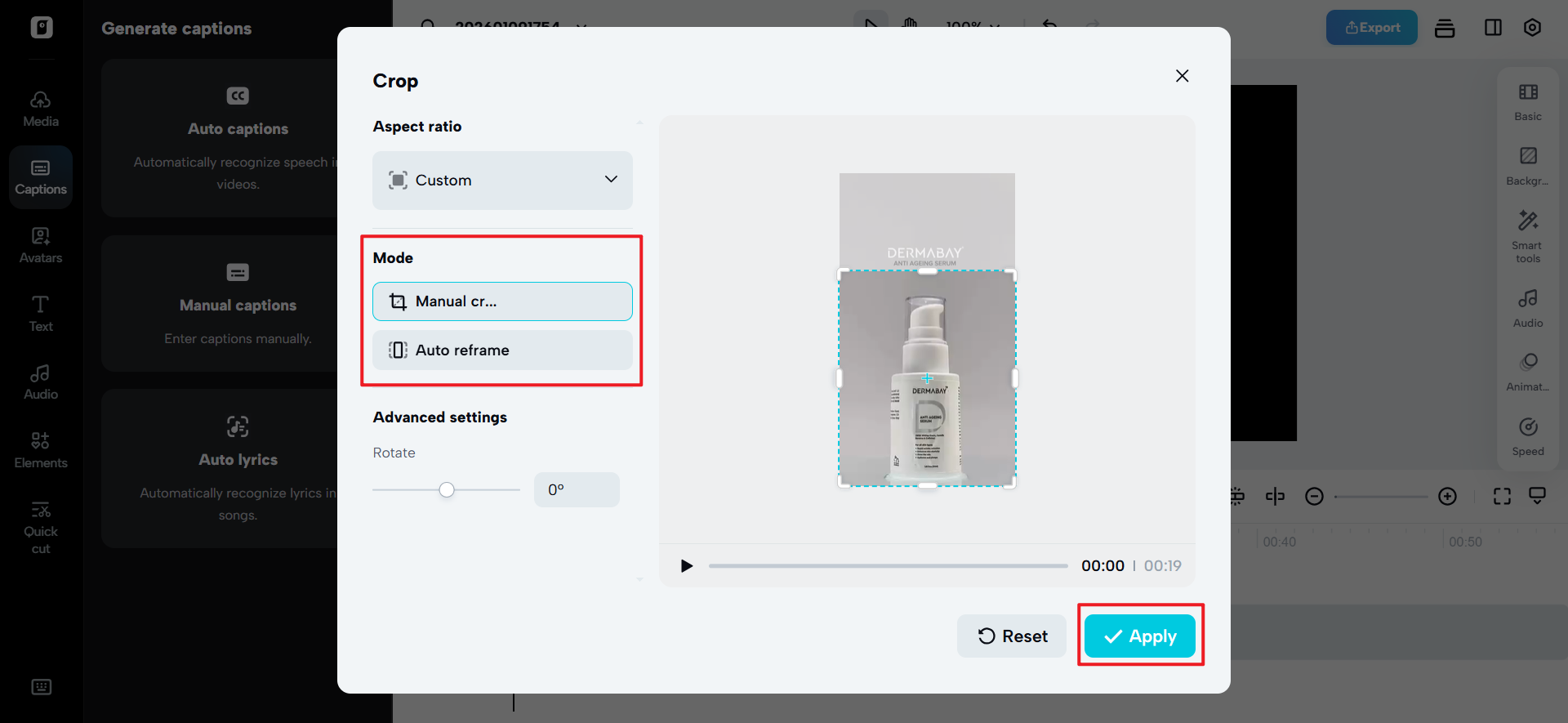
Select Smart Tools and go to Auto Reframe. Select your Aspect Ratio and select Manual Crop or Auto Reframe, and select Apply. The frame is cropped effectively to get rid of watermarks or any other text.
You can select Remove Background and enable Auto Removal to remove the background that holds the text. Click the background to insert a background color or go to the Elements tab and insert a background video or image to layer behind the text.
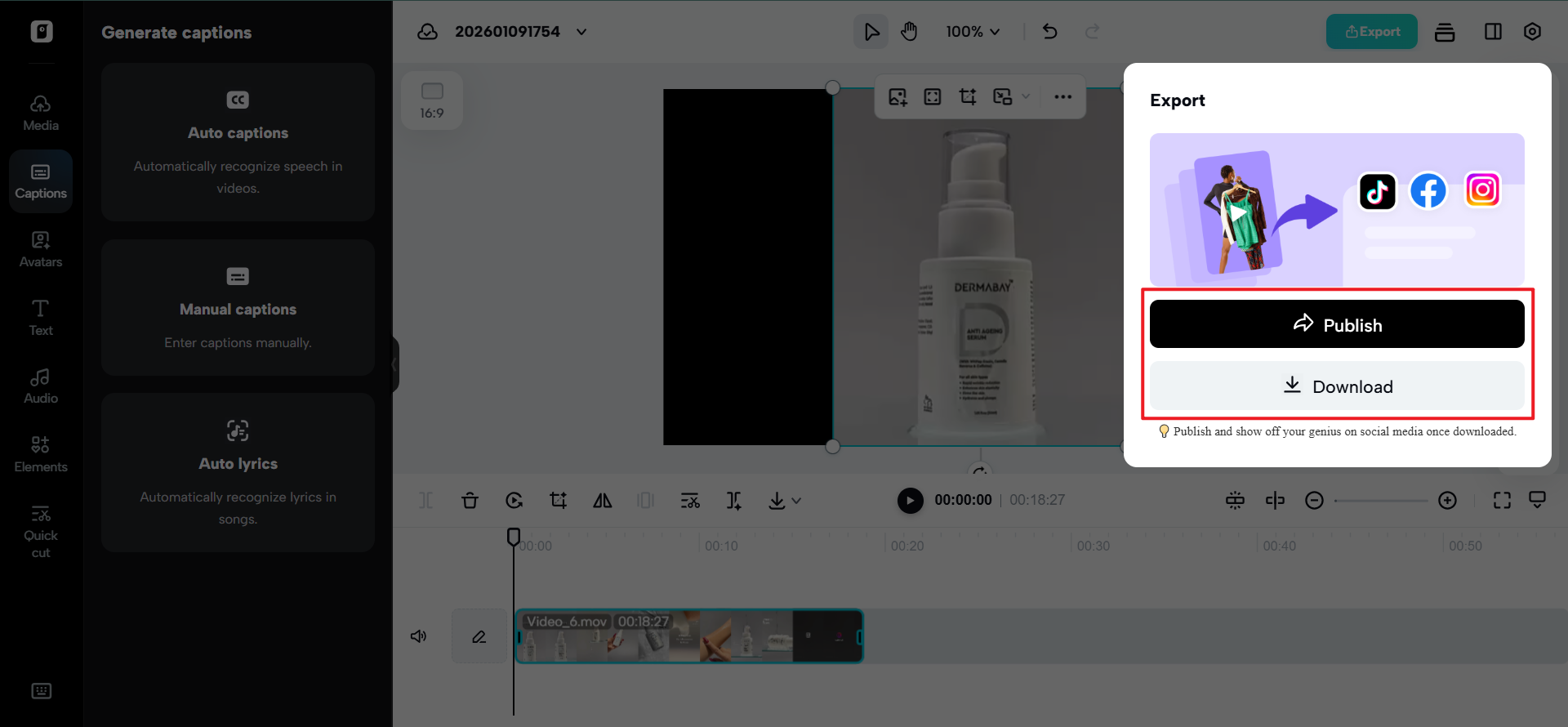
Click “Export” in the top right corner and select “Publish” or “Download.” You can then configure your settings for exporting and click Export once more to either save it to your computer or send it directly to social platforms.
Testing the Silence (A Simple Creator Trick)
This is how a quick diagnostic check, used by many pros, looks
View your video in silence, in another room, on a smaller screen.
If you still understand:
Who it’s for
What is
Why it matters
You have perfectly captured silent clarity.
The Power of Silence as a Creative Constraint (That Actually Helps)
Designing without text equals forcing better decisions.
More deliberate about what you are with:
Camera movement
Subject positioning
Timing and Pacing
Visual hierarchy
Ironically, subtracting details is often more effective.
The future of short-form video isn’t louder; it’s clearer.
Winners of the feed are creators who respect how people actually watch-quickly, quietly, and intuitively-designed videos that don’t ask for attention but instead earn it visually.
With Pippit, you are designing understanding, not just editing clips. From planning scenes with smart tools through cleaning visuals for silent performance, it helps your content communicate before a single word is read or heard.
Build a silent-first video with Pippit today and make every scroll stop-even in complete silence.